
How to set up Bidstation’s email settings to enable sending from Gmail.
Current as of Jan 26, 2026
Email is an efficient way to distribute invoices both at the event (for bidders to view on their phones) and/or post-event, along with a thank you note. For full details, please consult the Bidstation User Guide and online how-to article with video.
Bidstation is not pre-configured with email sending details. This is to allow you to use your organization’s settings so email is recognizable by your bidders when it lands in their inbox i.e., gala@humanfund.com. Google’s Gmail can also be used in Bidstation for email sending, but it requires specific setup in the Gmail account for it to work correctly.
This document is provided to assist you with setting up a Gmail account so that it can be used in Bidstation for sending invoices by email. At the time of publishing, these instructions were accurate and worked. If you try them and it is not working, please let us know.
Please ensure you set up and test emailing before the event.
Gmail setup for Bidstation
1. Enable 2-step verification. (2FA) If 2-step verification is not turned on for your Google account, you’ll need to do that first.
From your Google account settings, add 2-Step Verification to your Google account. You can use the search box (highlighted in the image below) at the top of the setting page, highlighted below, to quickly find this setting.
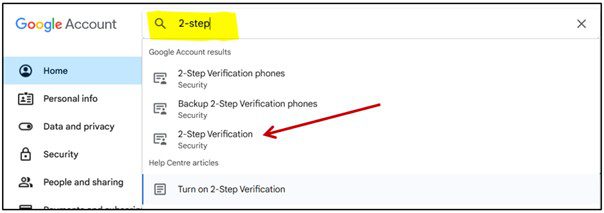
Follow the steps to activate 2-step verification.
2. Create an app password. This will be used in Bidstation email SMTP settings. Use the settings search box to quickly find the app password setting. Create an app password using a name like “Bidstation” or something you will recognize for future reference. Record the app password you create.
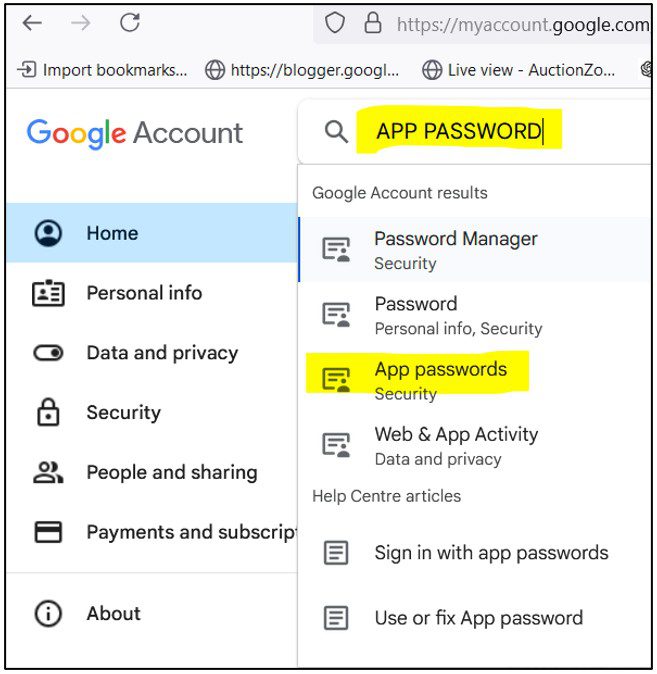
Record the app password you create.
3. Configure Bidstation Settings. Open Bidstation, Invoices, Email Invoices. Select at least one bidder to send an invoice to so you open the next window to edit the SMTP settings.
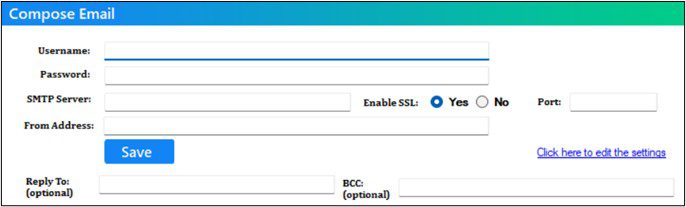
- Username: your Gmail email address.
- Password: the app password you created above, without spaces.
- SMTP Server: smtp.gmail.com
- Enable SSL: Yes
- Port: 587
- From address: this must match the email address used for Username.
You may add a different Reply To if you want replies or bounce backs for un-deliverable notifications to go to an address other than the Username, and BCC address if you want to send a copy of each to it as well.
Select the Invoice email template, edit the subject and email message as needed. Save the message. Bidstation should now be able to send invoices by email. Try sending yourself a test invoice, to ensure it’s working.